Move to a new PC without losing your Dalamud setup.
XIV Vault backs up your plugin settings, Dalamud's settings and the game's own HUD, hotbars, keybinds and macros into a plain ZIP in a folder you choose. On a fresh PC you install XIVLauncher, open XIV Vault and restore.
A backup, then a restore that takes a safety backup first. The plugins and numbers are sample data.
What does it back up?
The settings you spent years building, and nothing else. XIV Vault reads only the items below, copies them byte for byte, and never looks inside them.
%AppData%\XIVLauncher
XIVLauncher and Dalamud
Item
In backups
What it is
pluginConfigs\
Backed up
Every plugin's settings, with the plugin's own folders. Logs, caches and temporary files inside are left out.
dalamudConfig.json
Backed up
Dalamud's settings, including your custom plugin repositories.
dalamudVfs.db
Backed up
Dalamud's plugin database.
dalamudUI.ini
If you choose
Window positions and sizes. Off at first, because layouts rarely suit another monitor.
installedPlugins\
Never
The plugins themselves. Install them again from /xlplugins, and they find their settings waiting.
runtime\, addon\, logs
Never
Dalamud's own program files, logs and caches.
Documents\My Games\FINAL FANTASY XIV - A Realm Reborn
The game's settings
Item
In backups
What it is
FFXIV_CHR…\*.DAT
Backed up
Each character's HUD layout, hotbars, keybinds, macros, gear sets and log filters.
MACROSYS.dat
Backed up
Shared macros.
FFXIV_CHARA_*.dat
Backed up
Appearance saves from character creation and the aesthetician.
FFXIV.cfg
Backed up
Graphics, sound and display, including the resolution and monitor. You choose at restore whether it comes back.
log\, screenshots\
Never
Chat logs and screenshots, along with old copies of settings files.
A character's folder is named by an ID that identifies the character, so XIV Vault counts characters and never shows or logs that ID. XIVLauncher's own settings and the game install are not backed up.
How do I install it?
Download Setup, xiv-vault-setup-win-x64.exe. It installs XIV Vault for your Windows user, with no administrator prompt, and adds it to the Start menu.
Run it. Setup is signed by Hazel Granados. While a release is new, Windows SmartScreen may still ask you to confirm it: choose More info, then Run anyway.
Open XIV Vault from the Start menu. It finds XIVLauncher on its own, and Back Up Now makes your first backup.
No .NET install is needed. XIV Vault offers updates and installs them only when you choose. A portable copy and the command line are on the release page, with SHA256SUMS to check every download.
Setting up a new PC?
Install XIVLauncher and start it once.
Make your backups reachable: sign in to OneDrive or Dropbox, or plug in the drive. Backups that stay in the cloud are listed without being downloaded.
Install XIV Vault and open Restore. Backups in OneDrive\XIV Vault are found on their own.
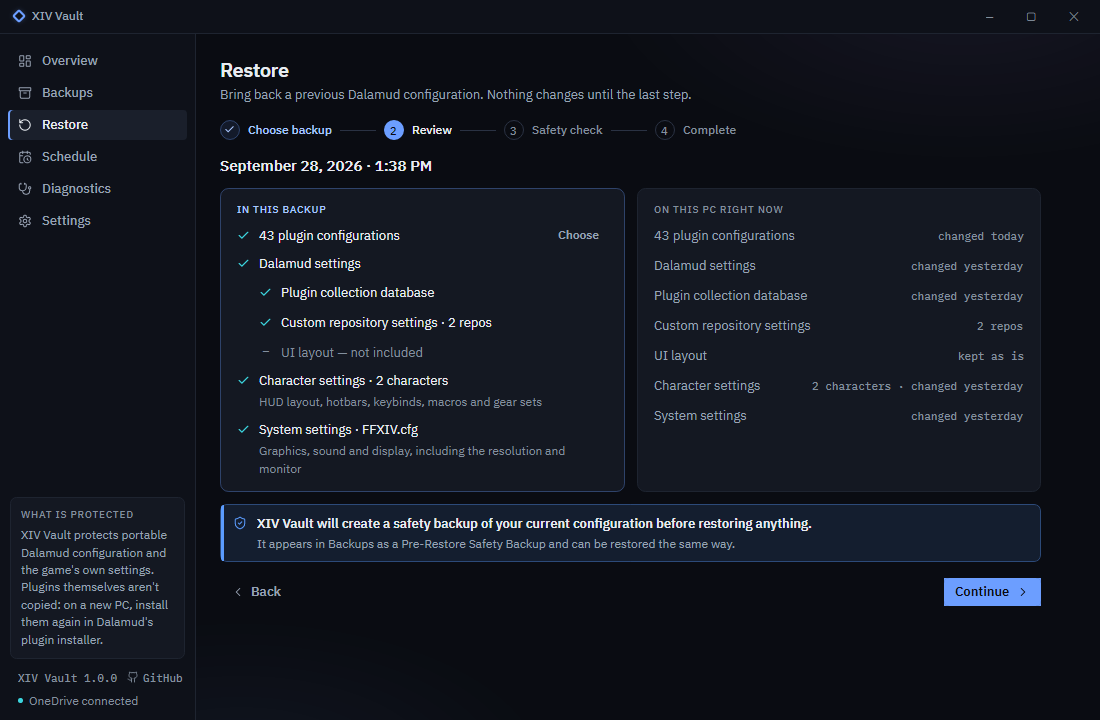
Review and restore. Leave out a plugin or the system settings if they shouldn't come back, then choose Restore Configuration.
Open XIVLauncher and log in. The game finds your HUD, hotbars and macros.
Install your plugins again. Type /xlplugins in the chat to open Dalamud's plugin installer; Dalamud doesn't reinstall them on its own. Each plugin picks up its settings when it is installed.
(opens full size)The review shows what a restore would change before anything does.
Can I trust it with my settings?
XIV Vault is built around what could go wrong. The full safety model is in the README.
Every backup is checked before it counts.
Each archive is written under a temporary name, read back and checked against the SHA-256 of every file, then renamed. Old backups are removed only after a new one passes.
A safety backup comes first.
Every restore first saves what is on this PC now, so today's settings are one restore away. It holds everything a full restore would replace, even when you restore only some plugins.
Nothing changes while the game runs.
A restore refuses while XIVLauncher or FFXIV is open, because the game rewrites its settings when you log out. A scheduled backup waits for the game to close.
Nothing is deleted or run.
Files the backup doesn't hold stay where they are. Each character's settings go back to that character's folder only. Nothing in a backup is ever executed, and unsafe archives are refused.
Nothing about you leaves your PC.
No accounts and no telemetry. The only network call is the update check, which reads the public release list from GitHub and can be turned off. Your sync client moves the backups, not XIV Vault.
Old backups keep working.
Each backup is an ordinary ZIP: a manifest.json that lists every file with its SHA-256, and the files themselves under payload/. Any ZIP tool opens it, the format is documented, and every backup any version made restores in every later version.
Building plugins or tools?
For plugin developers
What XIV Vault does with your plugin's files, so you can tell your users what survives a move.
It backs up pluginConfigs\YourPlugin.json and the pluginConfigs\YourPlugin\ folder byte for byte, with every subfolder. In the ZIP they sit under payload/pluginConfigs/.
Folders named logs, log, cache, caches, temp or tmp, and files ending in .tmp, .temp, .partial, .log or ~, are left out. Keep caches there and backups stay small.
Data you keep outside pluginConfigs\ is not backed up.
A restore writes your files only while the game is closed, and never deletes files the backup doesn't hold.
People can restore just your plugin, from the restore review or with --plugin.
Anything in your config travels with the backup, including tokens or keys. Say so if your plugin stores them.
Not yet. XIVLauncher.Core keeps the same Dalamud and game files, so restoring a Windows backup onto a Deck is planned after 1.0.
Something went wrong?
Open Diagnostics, choose Copy Diagnostic Report and paste it into a new issue. The report holds paths, versions and results, never your settings. The troubleshooting guide covers the common cases.
XIV Vault is an independent, unofficial tool. It is not affiliated with or endorsed by Square Enix, or by XIVLauncher (goatcorp) and Dalamud.