What should you farm for gil right now?
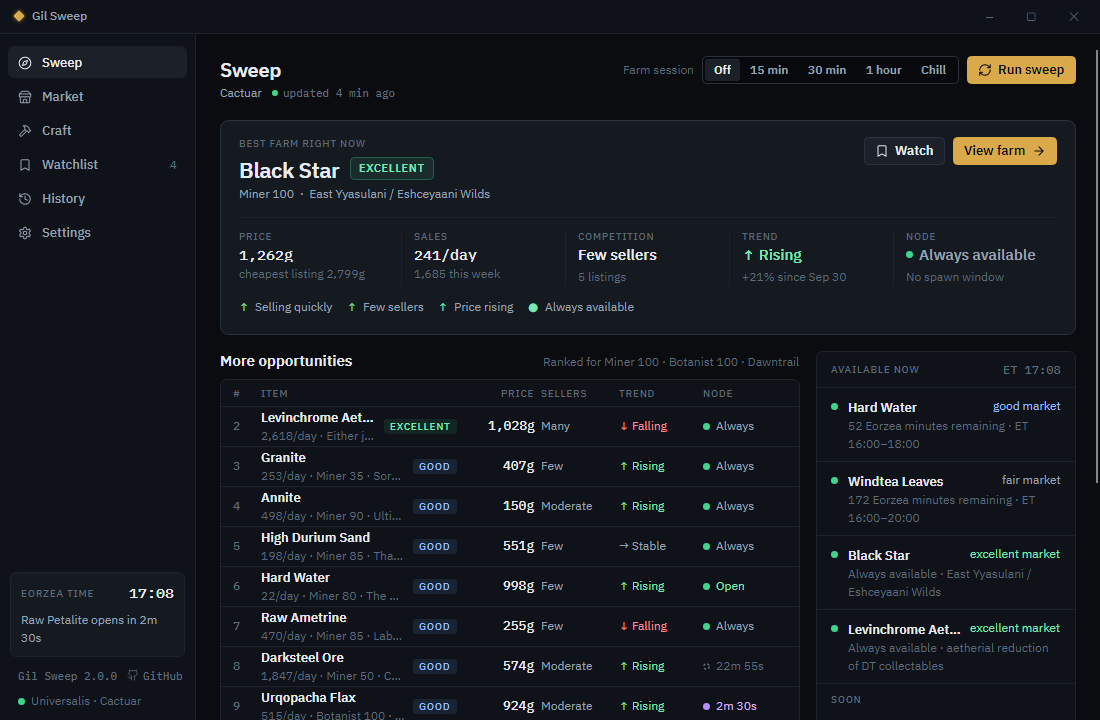
Gil Sweep prices the gatherables worth tracking on your FINAL FANTASY XIV world, checks how crowded each market board is and which way prices are moving, follows the Eorzea clock for timed nodes, and puts the best farm you can gather this minute at the top, with the reasons why.
- Free and open source, Apache-2.0
- Signed by Hazel Granados
- No account, no telemetry
- All downloads, including a portable copy
What does it show?
Six screens, each answering a question a gatherer has. Gil Sweep runs on Windows beside the game, never inside it.
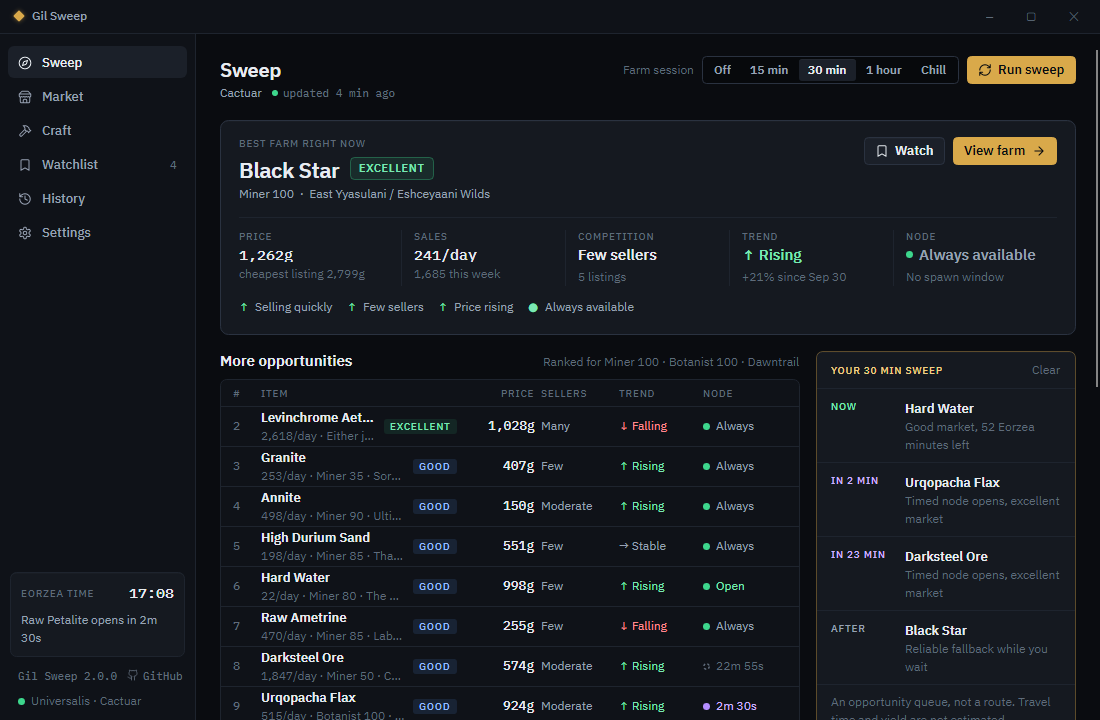
Sweep
The best farm right now and why. More opportunities ranked below, what is open now and what opens soon, the daily map pick and a craft worth processing.
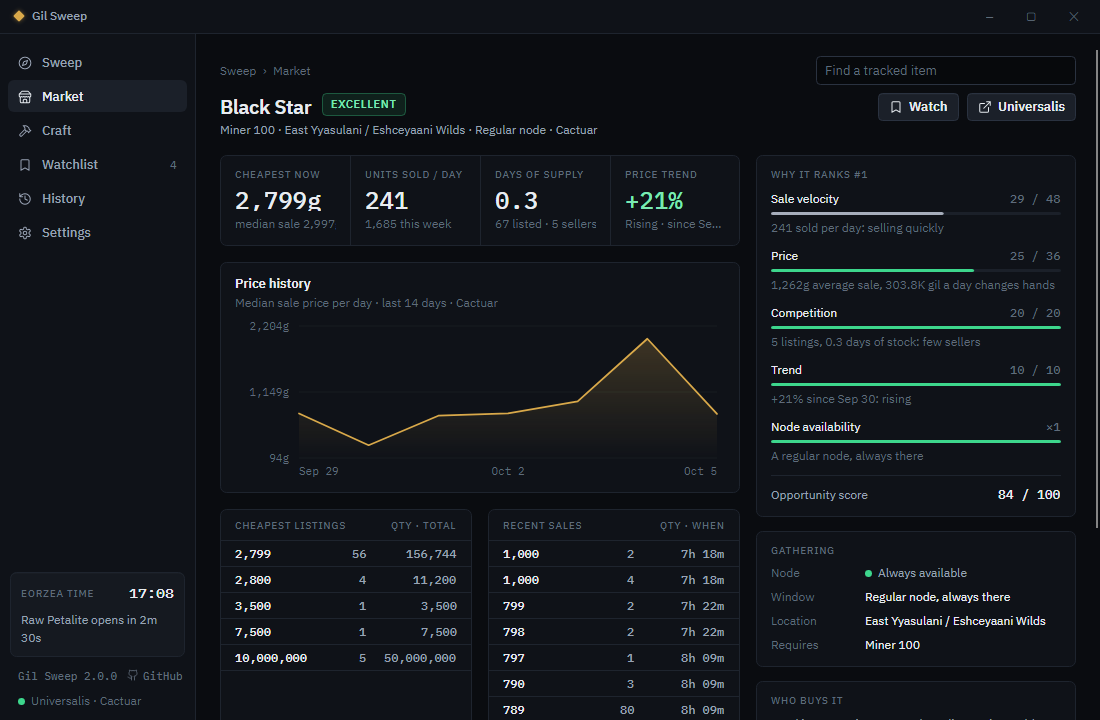
Market
One item in depth: live listings and recent sales, two weeks of prices, the hours it sells, days of stock, where and when to gather it, and what to list it at.
Craft
Sell a material raw or process it first? Each material's best recipe at current prices, with locked recipes shown against your crafter levels.
Watchlist
A reminder before a node opens, price spikes and crashes, and undercuts of your retainers, as Windows notifications.
History
Your sweeps, what topped each one, the week's movers and a CSV export.
Settings
World, gatherer and crafter levels, story progress, folklore books, retainer names, tracked items and updates.
 (opens full size)
How does it pick a farm?
Each item you can gather gets an opportunity score from 0 to 100, and every recommendation shows the facts behind it.
Market up to 70 points
How much gil changes hands for it on your world each day: the average sale price times the units sold.
Competition up to 20 points
How many days the stock already on the market board would last. The fewer, the sooner your listings sell.
Trend up to 10 points
Which way its average price moved since a sweep about a week old.
Node a multiplier
Regular nodes and open timed nodes count in full. A timed node counts for less the longer you'd wait for it.
Gil Sweep never shows gil per hour. It doesn't know how much a node gives, how long the trip is or how fast you gather, so it compares markets instead of pretending.
Only items you can gather are ranked. Your levels and story progress decide, and top sellers nobody gathers, like vendor flips and submarine loot, are tracked but never recommended. The full method has a worked example.
 (opens full size)
How do I install it?
- Download Setup,
gil-sweep-setup-win-x64.exe. It installs Gil Sweep for your Windows user, with no administrator prompt, and adds it to the Start menu. - Run it. Setup is signed by Hazel Granados. While a release is new, Windows SmartScreen may still ask you to confirm it: choose More info, then Run anyway.
- Answer three questions: your world, your Miner and Botanist levels, and your story progress. Run first sweep prices your world.
No .NET install is needed. Updates install only when you choose, never during a sweep. A portable copy, which doesn't update itself, is on the release page, with SHA256SUMS to check every download.
What does it send, and where?
No accounts, no cloud and no telemetry. Your settings, sweep history and alert log stay in %AppData%\GilSweep. These are the only places Gil Sweep connects to.
| Service | When | What for |
|---|---|---|
| Universalis | Every sweep | Prices, sales and listings on your world. |
| Saddlebag Exchange | Every sweep, unless turned off in Settings | Trend states for the items it ranks. |
| XIVAPI and Garland Tools | When you add an item in Settings | Looking up the item you added. |
| GitHub | When an installed copy starts, unless turned off | The public list of releases, to find an update. |
| Anything about you | Never | Your settings, retainer names and history stay on your PC. |
Gil Sweep doesn't touch the game: it never reads or changes the game client or its files. Found a security problem? Report it privately.
Notifications and the tray?
While Gil Sweep runs, it sweeps every hour and follows the Eorzea clock. Watched items send Windows notifications. Closing the window keeps Gil Sweep in the tray, where the icon shows the Eorzea time and the next node windows.
Coming from Gil Sweep 1?
Version 1, the Electron app, doesn't update itself to 2. Install version 2 with Setup: on first start it brings over your world, levels, watched items, tracked items and sweep history. Then uninstall version 1.
Something went wrong?
Open a new issue with what you did, what happened and your version, shown at the bottom of the sidebar.
Want to help?
Issues labelled good first issue are small and can be checked offline. CONTRIBUTING.md says how to build, test and send a change.
Gil Sweep is an independent, fan-made market tool. It is not affiliated with or endorsed by Square Enix. Market data comes from Universalis and Saddlebag Exchange, and item, node and recipe data from Garland Tools and XIVAPI.
FINAL FANTASY is a registered trademark of Square Enix Holdings Co., Ltd. FINAL FANTASY XIV © SQUARE ENIX.